GasPay SDK

1. Initialization

1.1 install

// npm
npm install @aabank/sdk
// yarn
yarn add @aabank/sdk
// pnpm
pnpm add @aabank/sdk

1.2 init

Contact us to auth you an appId

import AAbankSDK from '@aabank/sdk';

type extraConfig {
    isDebug: Boolean;
    ...
}

const appId = "000000";

const initSdk = async () => {
    const provider = await connector?.getProvider() 
    // window.etherum.sendAsync or wagmi getProvider
    const sdk = new AABank(provider, appId, { isDebug: true })
    const { caAddress, publicKeyDerived } = await sdk.init()
    ...
}

2. Methods (API)

2.1 init()

Init the SDK to continue use SDK method

2.2 isCaAddress()

CA address will create after the first deposit operation

2.3 getBalance()

2.4 getTransferInfo()

2.5 getTransactionInfo()

2.6 sendTransaction()

2.7 getTransactionStatus()

2.8 getTradeHistory()

2.9 getDepositHistory()

2.10 withdraw()

3. Business Scene

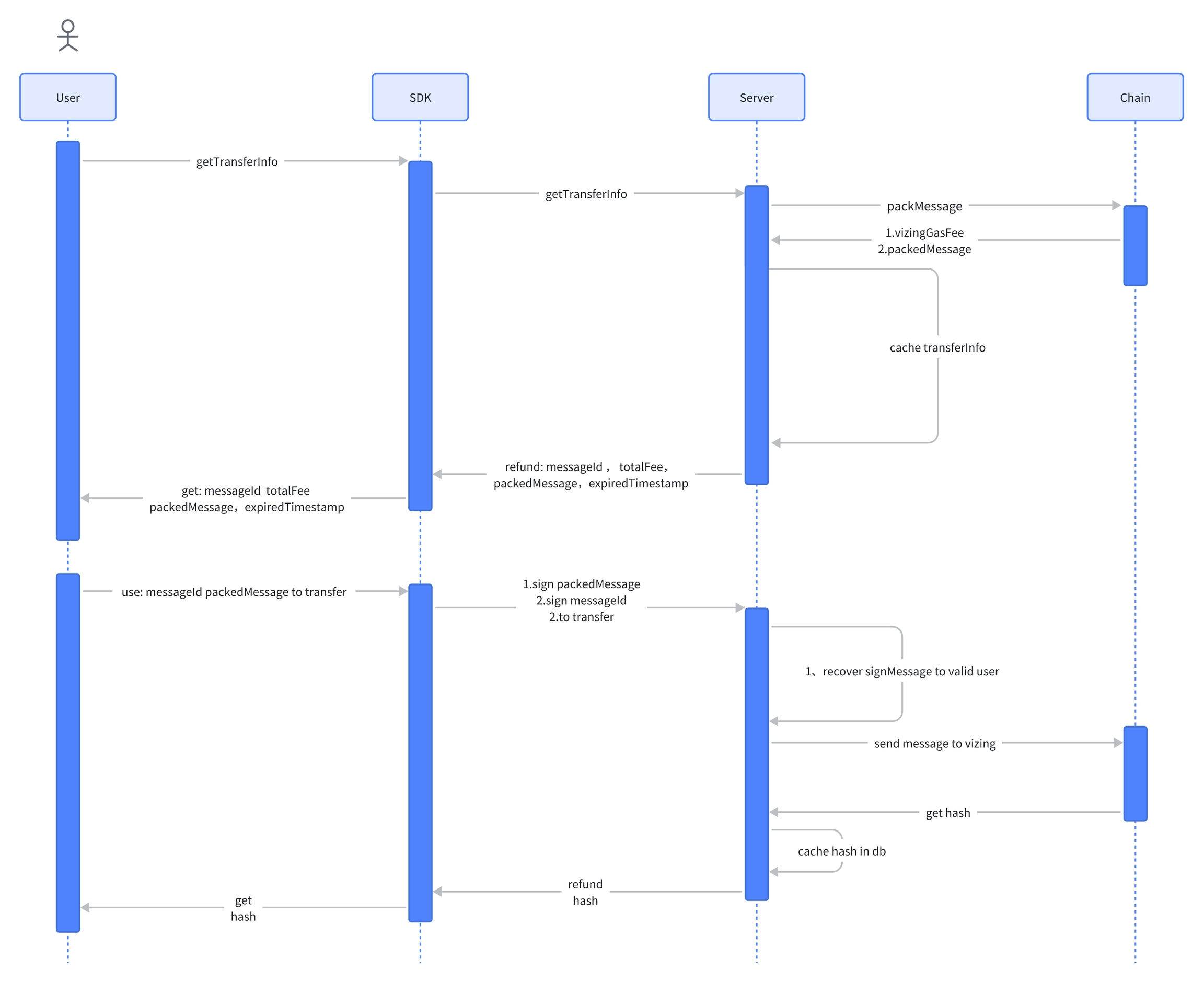
3.1 Transfer

Transfer Timeline
3.2 Withdraw

3.3 Transaction

Send custom message to vizing omni contract

4. Error

If an ApiError is caught, you can get the corresponding error code and error information from the ApiError object.

Code
Message
Desc

1001

Balance not enough

The account balance not enough for start a transaction

1002

From chainId and to chainId can not be the same

1003

Invalid CA address

Account address is not a CA address

1004

Cross chain amount not enough

1005

Vizing API error

1006

Amount less than min fee

Transfer amount is less then total fee

1007

Transaction info expired

Call transfer method after expiration timestamp

1008

Signature validation failed

1009

Withdraw operation receiver can not be a ca address

1010

Exchange rate not found

Can't calculate fee for transfer ERC20 token

1011

Handle transaction time out

1012

Handle transaction failed

1013

Transaction info not found

5. React

5.1 Hooks (Child Component)

Last updated